Customer Portal
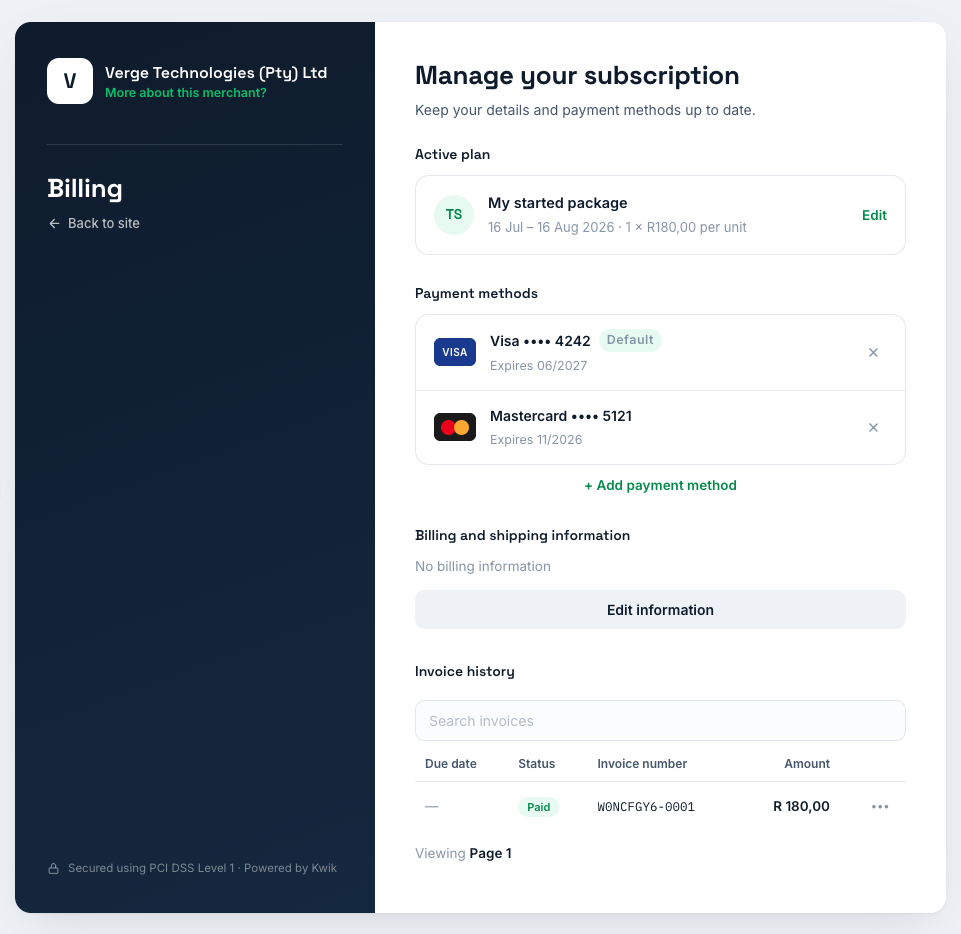
Request
Request to generate a customer postal page session URL.
Path
POST /customer-portal/link
Example (No Subscription)
The example below only includes the customer_id. When no subscription_id is provided, the customer will be presented with the available packages and can create a new subscription.
{
  "customer_id": "cus_abc123...",
}
Example (Subscription)
The example below includes both the customer_id and subscription_id. This allows the customer to manage a specific subscription. If the subscription is inactive, the customer will have the option to reactivate it.
{
  "customer_id": "cus_abc123...",
  "subscription_id": "sub_abc123...",
}
Example (Advanced settings)
The example below demonstrates how to override the default settings configured in the dashboard. This can be useful when you need to disable specific features for certain customers or subscriptions, or when different products should be displayed for a particular subscription.
Note that the default settings can be updated on the portal under Settings -> Customer Portal.
{
  "customer_id": "cus_abc123...",
  "subscription_id": "sub_abc123...",
  "settings": {
    "show_invoices": true, // allow the user to view the invoices
    "billing_info_type": "UPDATE", // Allow the user to update billing info on page
    "cancel_type": "END_OF_PERIOD", // The plan will be scheduled to be canceled at the end of the billing period
    "plan_change_type": "SMART", // When a plan is changed, how should the calculations be handled
    "available_product_ids": ["pro_abc123...", "pro_abc123..."], // Specify available products that the user can select as a plan. This will be grouped by interval and ordered from the smallest amount to largest
    "redirect_url": "https://my-portal.site.com", // Back to site link
    "page_title": "My SaaS business" // Specify the left side page title
  }
}
Request Parameters
Request field details. Y = always required, C = conditional, N = optional.
Field | Required | Type | Description | Example |
|---|---|---|---|---|
| customer_id | Y | String | The customer the portal link is generated for | cus_abc123... |
| subscription_id | N | String | Manage a specific subscription. If omitted, the customer can select a package to create a new subscription. If the subscription is inactive, the user can reactivate it. | sub_abc123... |
| settings | N | Object | Override the default portal settings. Omit to use your account defaults. | See advanced example |
| settings.show_invoices | N | Boolean | Allow the user to view their invoices | true |
| settings.billing_info_type | N | ENUM | Controls access to billing information. Available values: NONE, VIEW, UPDATE. | UPDATE |
| settings.cancel_type | N | ENUM | Controls subscription cancellation. Available values: NONE, IMMEDIATE, END_OF_PERIOD. | END_OF_PERIOD |
| settings.plan_change_type | N | ENUM | Controls how subscription plan changes are handled. Available values: NONE, IMMEDIATE, END_OF_PERIOD, SMART. | SMART |
| settings.available_product_ids | N | Array | Product IDs available for selection. Products are grouped by billing interval and ordered from the lowest price to the highest price. | "pro_abc123...", "pro_def456..." |
| settings.redirect_url | N | String | Where the user is redirected when they select Back to Site or close the portal. | https://my-portal.site.com |
| settings.page_title | N | String | Override the page title displayed on the left side of the portal. | My SaaS business |
billing_info_type
| Value | Description |
|---|---|
| NONE | Hide billing information |
| VIEW | Allow the user to view billing information |
| UPDATE | Allow the user to view and update billing information |
cancel_type
| Value | Description |
|---|---|
| NONE | Subscription cannot be cancelled |
| IMMEDIATE | Cancel the subscription immediately |
| END_OF_PERIOD | Cancel the subscription when the current billing period ends |
plan_change_type
| Value | Description |
|---|---|
| NONE | Subscription plan cannot be changed |
| IMMEDIATE | Any plan change takes effect immediately |
| END_OF_PERIOD | Any plan change takes effect when the current billing period ends |
| SMART | Upgrades take effect immediately with prorated billing. Downgrades take effect when the current billing period ends. |
Response Body
{
    "status": true,
    "result": {
      "id": "cpl_HVpCeoNys1f22X7QcuWHY",
      "session_id": "ses_G-xkVKoxHgEBrY8suKgR3",
      "customer_id": "cus_abc123...",
      "subscription_id": "sub_abc123...",
      "link_url": "https://pay.kwik.co.za/portal/a0oDxntJxWlA8LjfOR9bgck9C4w....",
      "expires_at": "2026-03-13T12:30:00Z"
    }
}
Response Parameters
Field | Type | Description | Example |
|---|---|---|---|
| status | Boolean | Indicates if the request was successful | true |
| result.id | String | Unique customer portal link identifier | cpl_HVpCeoNys1f22X7QcuWHY |
| result.session_id | String(32) | Session identifier for the portal link | ses_G-xkVKoxHgEBrY8suKgR3 |
| result.customer_id | String(32) | Associated customer ID | cus_abc123... |
| result.subscription_id | String(32) | Associated subscription ID, when a subscription_id was supplied | sub_abc123... |
| result.link_url | String | URL to redirect the user to the customer portal | https://pay.kwik.co.za/portal/a0oDxntJxWlA8LjfOR9bgck9C4w.... |
| result.expires_at | String | ISO timestamp when the portal link expires | 2026-03-13T12:30:00Z |
Lookups
Retrieve reference data and validation values used across the API including bank names, account types, countries, provinces, client types, and ID types. Essential for populating dropdown lists and validating form inputs.
Payment Methods
Retrieve available payment methods including EFT Debit Orders, DebiCheck, Registered Mandates, Card payments, and Pay-in methods. Essential for determining supported banks and payment options for your customers.